


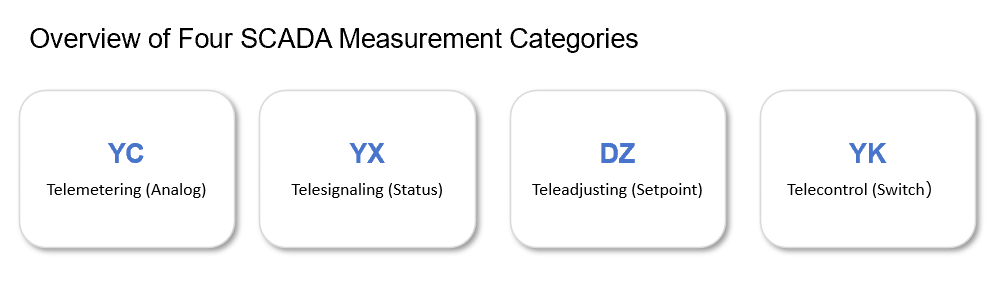
This article is the first in the Apache IoTDB end-to-end architecture series, focusing on the MQTT uplink pipeline of the EdgeBox gateway deployed at energy storage stations. Targeted at Java backend and EMS engineers, it systematically covers the four SCADA measurement categories — telemetering (YC), telesignaling (YX), teleadjusting (DZ), and telecontrol (YK), MQTT topic naming conventions, JSON payload formats, zlib+Base64 secure transmission, upload policies, and offline buffering mechanisms—laying the data foundation for subsequent transcoding, persistence, and real-time control.
The Role of Edge Gateways in Energy Storage Stations
Energy storage stations are equipped with large numbers of battery clusters, PCS (Power Conversion Systems), BMS (Battery Management Systems), thermal management, and fire suppression devices. After these devices connect to the local network via RS-485/CAN/Ethernet, they require a stable, secure, and observable channel to deliver data to the cloud time-series database. The Edge Gateway (EdgeBox) is the core node responsible for this task.
Taking an energy company as an example, its standard energy storage container is equipped with one EdgeBox, responsible for the following tasks:
Protocol Conversion: Unifies Modbus, CAN, and BMS proprietary protocols into MQTT messages.
Data Aggregation: Collects hundreds to thousands of measurement points at second-level intervals, packages and compresses them for uplink reporting.
Edge Computing: Performs local threshold violation detection and step-change detection, reducing cloud computing load.
Offline Buffering: Locally caches >3 days of data during network outages, with automatic backfill after recovery.
Remote O&M: Supports OTA upgrades, configuration push, and log backhaul.
Deep Dive into the Four SCADA Measurement Categories
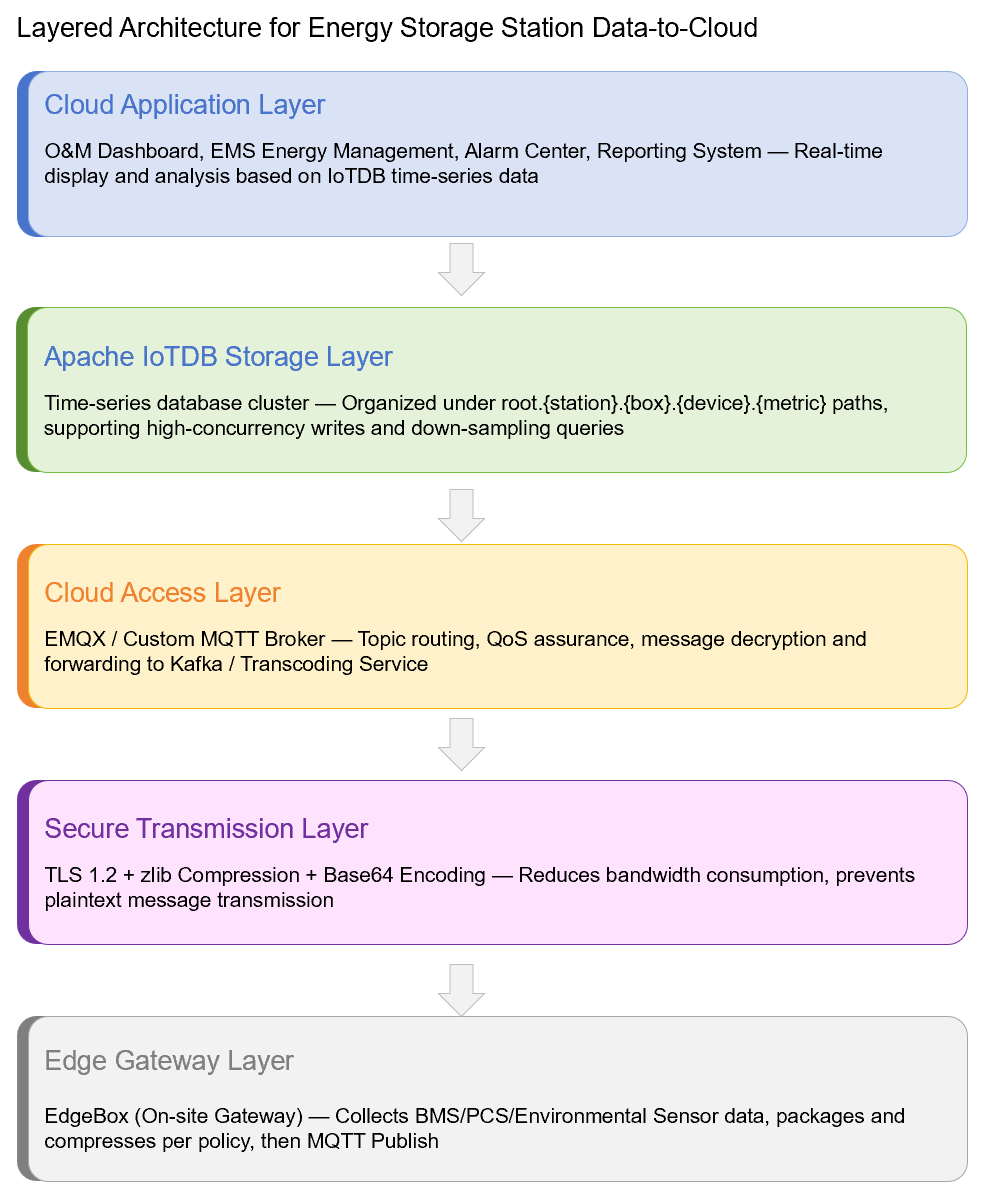
In the power and energy storage automation domain, device data is traditionally classified into the four SCADA measurement categories. Understanding the semantics and reporting policies of these four measurement types is the prerequisite for designing MQTT payload formats and topic rules.
Definitions and Typical Measurement Points:
Design Highlight: Measurement Point Encoding Specification
Each measurement point is maintained in a local "point table" on the EdgeBox, with unified encoding alignment between the cloud and the field. The recommended naming convention is {deviceCode}_{pointNo}, for example:
// BMS Cluster 1 battery voltage
 BMS01_YC_001

 // PCS operating status (telesignaling)
 PCS01_YX_003

 // Charge/discharge power setpoint (teleadjusting)
 EMS01_DZ_005
Keynote: Measurement point IDs should be hard-coded at the factory and only require mapping configuration on-site, preventing inconsistencies in encoding from causing cloud-side parsing failures.
MQTT Topic Rules and Payload Format
The EdgeBox reports data to the cloud broker via MQTT. Topic design must simultaneously satisfy the goals of "routing readability" and "access isolation."
Design Highlight: Topic Naming Convention
The following unified topic template is adopted:
edgeData/${siteAbbr}.${SN}Where:
siteAbbr: Site abbreviation, e.g., Station_HZ (example site)
SN: EdgeBox serial number, e.g., EB20240001 (example serial number)
Full example:
edgeData/Station_HZ.EB20240001Note: The edgeData/ prefix facilitates unified ACL rules on the broker; the siteAbbr.SN combination ensures topic uniqueness across multiple sites and devices under the same broker.
Design Highlight: Payload Format
The payload is a JSON array or a single JSON object, with each element containing the following fields:
Example Payload (Single Message):
{
  "object": "BMS01",
  "timestamp": 1719201600000,
  "metrics": {
    "YC_001": 3.285,
    "YC_002": 12.45,
    "YX_003": 1,
    "YX_004": 0
  }
}
Example Payload (Batch Array - recommended for high-frequency periodic reporting):
[
  {
    "object": "BMS01",
    "timestamp": 1719201600000,
    "metrics": { "YC_001": 3.285, "YC_002": 12.45 }
  },
  {
    "object": "BMS01",
    "timestamp": 1719201605000,
    "metrics": { "YC_001": 3.286, "YC_002": 12.46 }
  },
  {
    "object": "PCS01",
    "timestamp": 1719201600000,
    "metrics": { "YC_101": 150.0, "YX_103": 1 }
  }
]
Note: Batch arrays should keep a single MQTT message under 50 KB to avoid excessive memory pressure on the broker or client-side OOM.
Secure Transmission: zlib Compression + Base64 Encoding
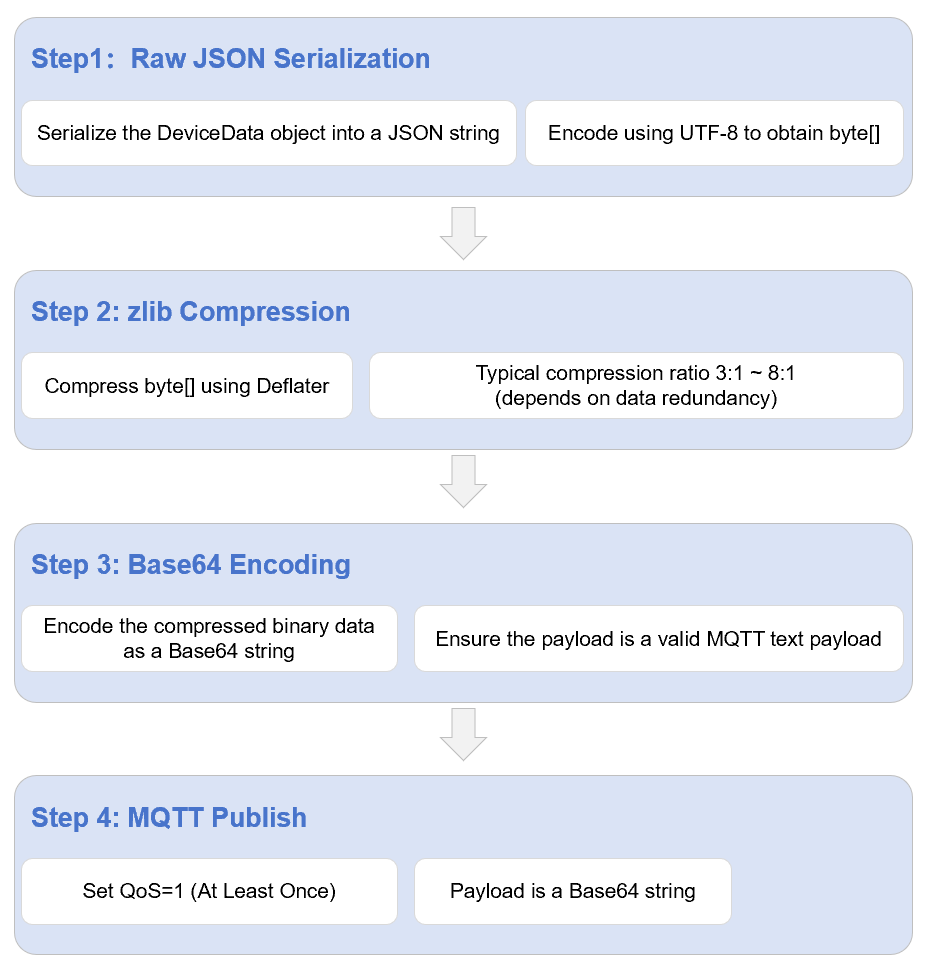
Energy storage station sites have complex network environments; some sites use 4G/5G public SIM cards with limited bandwidth and metered billing. Compressing and encoding the MQTT payload can significantly reduce transmission overhead.
Design Highlight: Compression and Encoding Flow
Code Example: Java Compression and Encoding Utility
import java.io.ByteArrayOutputStream;
import java.nio.charset.StandardCharsets;
import java.util.Base64;
import java.util.zip.Deflater;

public class EdgePayloadEncoder {

    /**
     * Compresses and encodes a JSON string into Base64 for MQTT uplink reporting.
     *
     * @param json The raw JSON string
     * @return The compressed string encoded in Base64
     */
    public static String encode(String json) {
        byte[] input = json.getBytes(StandardCharsets.UTF_8);
        Deflater deflater = new Deflater();
        deflater.setInput(input);
        deflater.finish();

        try (ByteArrayOutputStream outputStream = new ByteArrayOutputStream(input.length)) {
            byte[] buffer = new byte[1024];
            while (!deflater.finished()) {
                int count = deflater.deflate(buffer);
                outputStream.write(buffer, 0, count);
            }
            deflater.end();
            byte[] compressed = outputStream.toByteArray();

            return Base64.getEncoder().encodeToString(compressed);
        } catch (Exception e) {
            deflater.end();
            throw new RuntimeException("Payload encode failed", e);
        }
    }

    /**
     * Cloud-side decoding example: Base64 decode → zlib decompress → JSON string
     */
    public static String decode(String base64Payload) {
        byte[] compressed = Base64.getDecoder().decode(base64Payload);
        java.util.zip.Inflater inflater = new java.util.zip.Inflater();
        inflater.setInput(compressed);

        try (ByteArrayOutputStream outputStream = new ByteArrayOutputStream(compressed.length)) {
            byte[] buffer = new byte[1024];
            while (!inflater.finished()) {
                int count = inflater.inflate(buffer);
                outputStream.write(buffer, 0, count);
            }
            inflater.end();
            byte[] result = outputStream.toByteArray();

            return new String(result, StandardCharsets.UTF_8);
        } catch (Exception e) {
            inflater.end();
            throw new RuntimeException("Payload decode failed", e);
        }
    }

    // Usage example
    public static void main(String[] args) {
        String json = "{\"object\":\"BMS01\",\"timestamp\":1719201600000," +
                      "\"metrics\":{\"YC_001\":3.285,\"YC_002\":12.45}}";
        String encoded = encode(json);
        System.out.println("Encoded length: " + encoded.length());
        System.out.println("Decoded: " + decode(encoded));
    }
}
Field Experience: For highly repetitive YC periodic data, zlib compression ratios typically reach 5:1 or higher. YX change-of-state reports have small data volumes with limited compression gains, so they can be sent as raw JSON to save CPU.
Upload Policies: Periodic, Change-of-State, and Second-Level Delta
Different telemetry types have different business values. Uniform fixed-period reporting wastes bandwidth and cannot meet real-time alarm requirements. The EdgeBox adopts differentiated upload policies.
Three Categories of Upload Policies
Design Highlight: Second-Level Delta Reporting for Cell-Level Data
Energy storage stations have a massive number of battery cells (a 100 MWh station may exceed 100,000 cells). If all were reported at fixed intervals, the cloud write pressure would be enormous. The EdgeBox maintains a local cell data cache and only packages and reports when single-cell voltage or temperature changes exceed the configured threshold (e.g., ±2 mV or ±0.1°C).
// Pseudocode for second-level delta reporting of cell-level data
public void onCellData(CellData data) {
    String key = data.getCellId() + "_" + data.getMetric();
    Double last = cache.get(key);
    if (last == null || Math.abs(data.getValue() - last) > threshold) {
        cache.put(key, data.getValue());
        mqttClient.publish(buildTopic(), encode(toJson(data)), QoS.AT_LEAST_ONCE);
    }
}
Note: The second-level delta policy must be paired with a "full synchronization" mechanism—for example, forcing a full cell data report once per hour—to prevent long-term cloud-side data inconsistency due to missed reports.
Offline Buffering and Network Recovery
Unstable networks at energy storage station sites (weak 4G signal, carrier maintenance, thunderstorms) are frequently encountered. The EdgeBox must have local caching and network-resume backfill capabilities to ensure data integrity.
Offline Buffering Mechanism:
Local Cache Capacity:
No less than 3 days of full data (estimated ~2.5 GB at 10s period, 1,000 measurement points)
Storage Medium:
eMMC/SSD ring buffer; overwrites oldest data by timestamp when full
Cache Format:
Binary sequential file; each record contains timestamp, topic, and compressed payload
Recovery Policy:
After network recovery, backfill in chronological order with rate limiting to prevent cloud impact
Backfill Priority:
YX change-of-state > YK telecontrol acknowledgment > YC periodic > cell-level delta
Design Highlight: Rate-Limited Backfill and Deduplication
After a network outage, the EdgeBox may have tens of thousands of messages queued. Sending them at full speed would cause an instantaneous traffic surge on the cloud broker and potentially trigger rate limiting. A token-bucket rate-limiting strategy is recommended:
// Guava RateLimiter (token bucket rate limiting) // Maven: com.google.guava:guava:32.x
 RateLimiter limiter = RateLimiter.create(100.0);

 public void replayBufferedMessages() {
    List<BufferedRecord> records = buffer.readAllOrdered();
    for (BufferedRecord r : records) {
        limiter.acquire();
        mqttClient.publish(r.getTopic(), r.getPayload(), QoS.AT_LEAST_ONCE);
        buffer.markAsSent(r.getOffset());
    }
 }
Key Point: The cloud transcoding service must implement idempotent writes—deduplicating or overwriting duplicate messages with the same timestamp, same device, and same measurement point—to avoid time-series database duplication caused by backfill.
Process Review
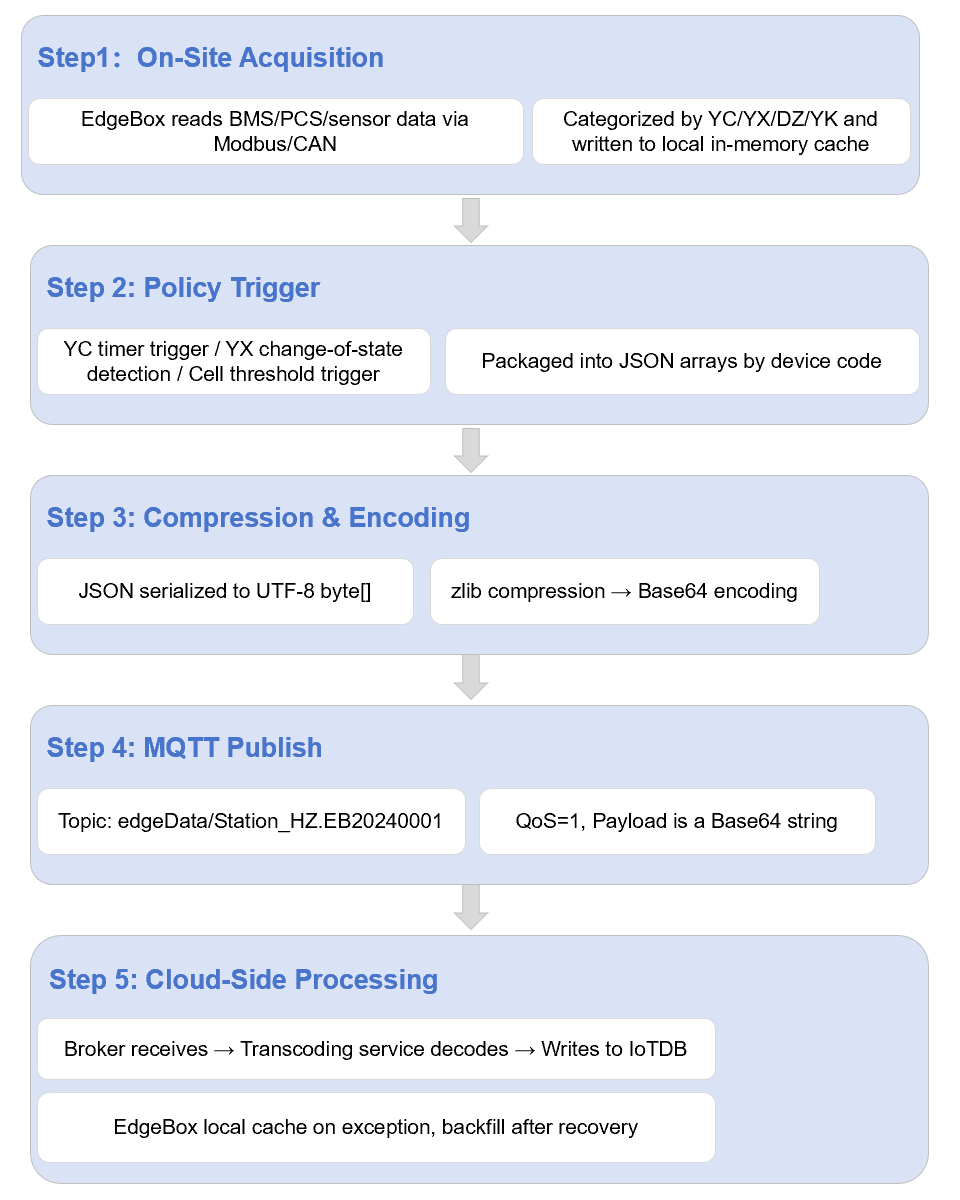
The following diagram illustrates the complete flow from data acquisition to MQTT reporting in the EdgeBox, showing how each layer collaborates:
Closing Remarks & Next Article Preview
The edge gateway is the first step for energy storage station data going to the cloud. Its design quality directly determines the data foundation for subsequent time-series storage, real-time visualization, and energy dispatching. The four measurement type classifications, compression encoding, and offline buffering strategies summarized in this article are all derived from real-world deployment experience at an energy company and have been anonymized.
During actual deployment, adjustments should be made according to site scale: smaller sites can reduce the YC reporting period to 30s to save bandwidth; larger sites need to pay attention to EdgeBox local cache capacity and backfill rate limiting to prevent impact on the cloud infrastructure.
In the next article, we will move to the cloud side and explain how MQTT messages are parsed, validated, and written into the IoTDB time-series database by the transcoding service.


