


This user-contributed article is the second installment in the author’s Apache IoTDB end-to-end architecture series. It focuses on the cloud-side payload decoding and transformation component, referred to here as Link Service. Written for Java backend and EMS engineers, it walks through MQTT subscription, Base64 decoding, zlib decompression, JSON parsing, measurement-point path mapping, batch writes, Redis-backed type caching, alarm filtering, and MQTT reconnection. The article lays the ingestion-pipeline groundwork for the author’s later discussions of measurement-tree design and cluster deployment.
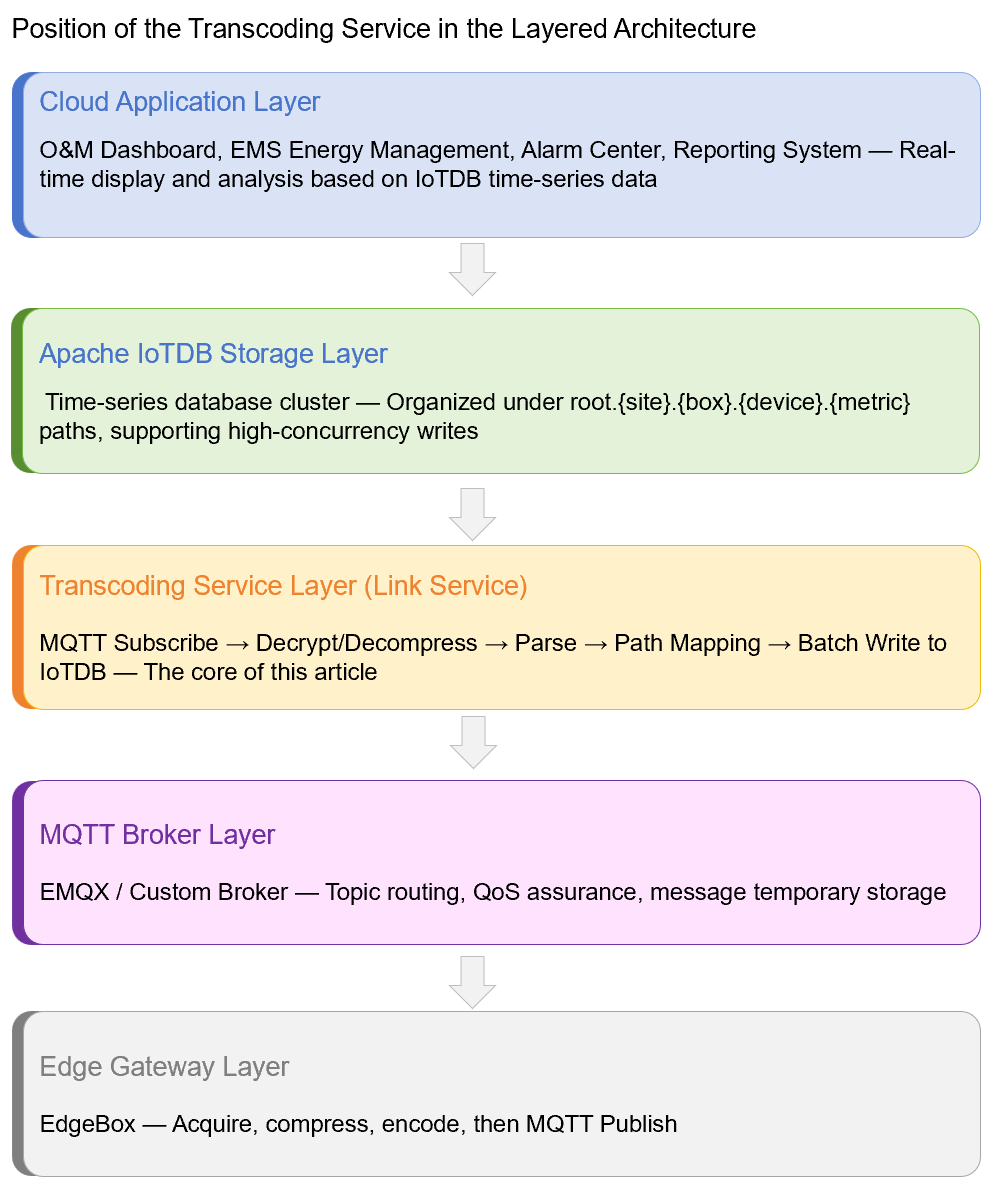
Positioning of the Transcoding Service in the Pipeline
In a cloud ingestion pipeline for energy storage stations , the transcoding service (LinkService) bridges the cloud access layer and the time-series storage layer. It converts compressed MQTT messages from the EdgeBox gateway into time-series data that Apache IoTDB can ingest, then writes that data in batches.
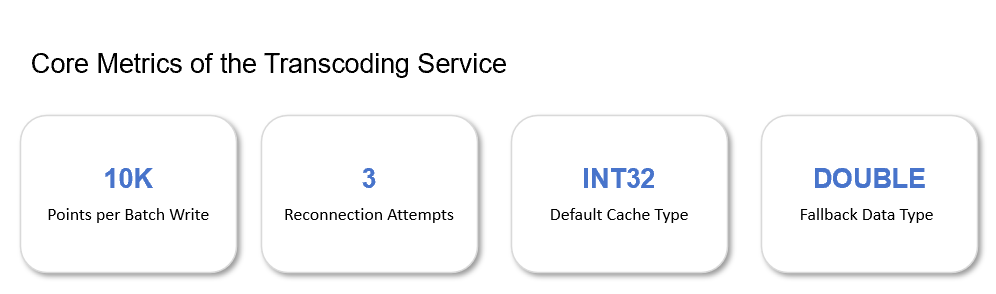
For example, a single site on an energy platform may reach a peak write throughput of 15,000 points per second. The transcoding service must therefore deliver high throughput, low latency, and high availability. Its responsibilities are as follows:
Protocol Conversion: MQTT Payload → JSON Object → IoTDB Data Point
Data Routing: Organize time-series paths by site, device, and measurement point.
Type Inference: Use Redis to look up measurement-point data types, such as INT32 and DOUBLE.
Alarm Forwarding: Forward data points that match alarm rules to a dedicated MQTT alarm topic.
Self-Healing: Reconnect to MQTT automatically after a disconnection and send a DingTalk alert if recovery fails.
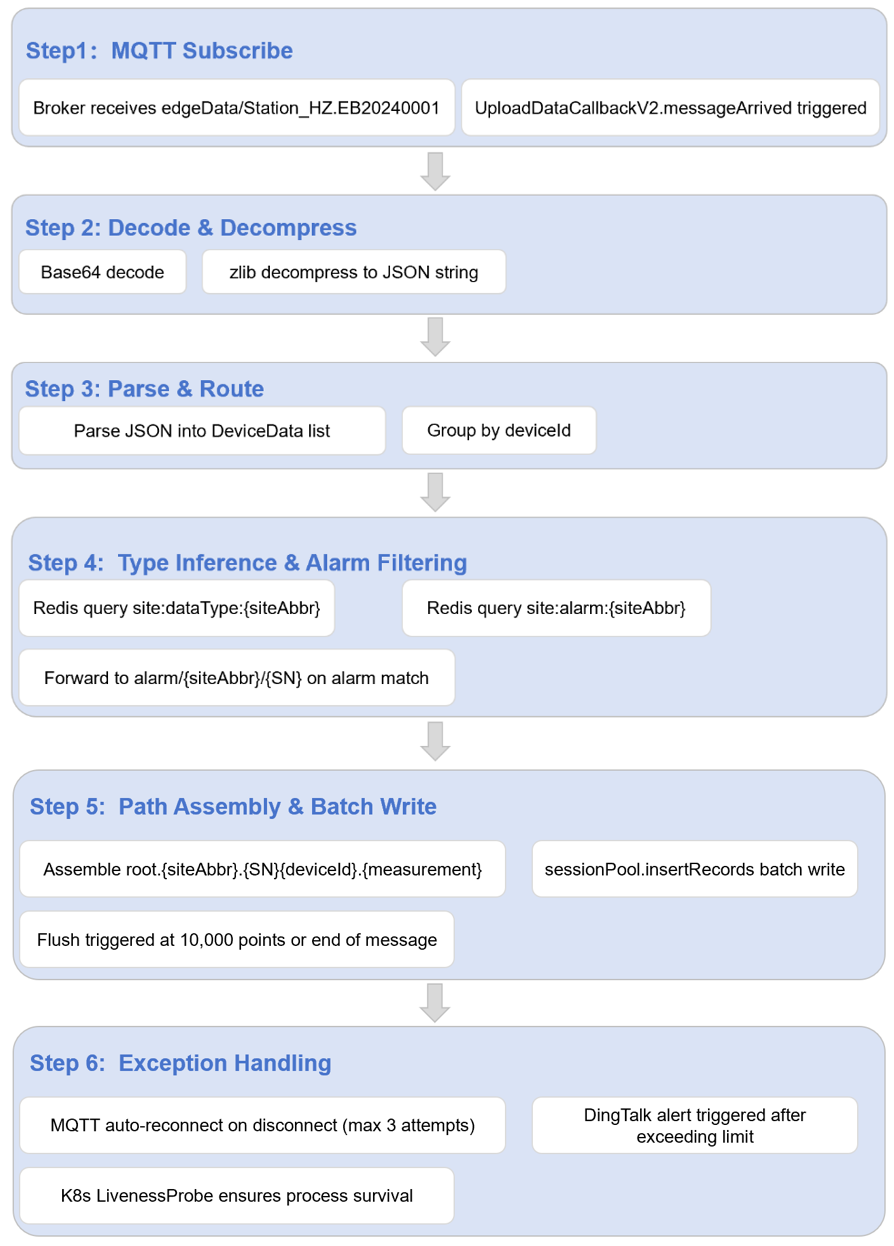
Core Code Flow: From MQTT to IoTDB
The transcoding service enters through the MQTT callback interface, UploadDataCallback, while the core processing logic resides in PubDataToIotDBServiceImpl.
Step 1: MQTT Subscription and Callback Entry
When the service starts, it subscribes to the edgeData/{siteAbbr}.{SN} topic on the broker. When a message arrives, UploadDataCallback processes it:
public class UploadDataCallback implements MqttCallback {

    private final PubDataToIotDBServiceImpl iotdbService;
    private final MqttClient mqttClient;
    private final String topic;
    private final DingTalkRobot dingTalkRobot;
    private final AtomicInteger reconnectCount = new AtomicInteger(0);
    // Lombok @Slf4j auto-generates the log field, or declare manually:
    // private static final Logger log = LoggerFactory.getLogger(UploadDataCallback.class);

    public UploadDataCallback(MqttClient client, String topic,
                                PubDataToIotDBServiceImpl service) {
        this.mqttClient = client;
        this.topic = topic;
        this.iotdbService = service;
    }

    @Override
    public void messageArrived(String topic, MqttMessage message) {
        try {
            // 1. Extract siteAbbr and SN
            String[] parts = topic.replace("edgeData/", "").split("\\.");
            if (parts.length < 2) {
                log.error("Invalid topic format, expected edgeData/{siteAbbr}.{SN}, got={}", topic);
                return;
            }
            String siteAbbr = parts[0];  // e.g., Station_HZ
            String sn = parts[1];          // e.g., EB20240001

            // 2. Enter the transcoding and write pipeline
            iotdbService.process(message.getPayload(), siteAbbr, sn);

            // 3. Reset the reconnection counter after successful processing
            reconnectCount.set(0);
        } catch (Exception e) {
            log.error("Process MQTT message failed, topic={}", topic, e);
        }
    }

    @Override
    public void connectionLost(Throwable cause) {
        log.error("MQTT connection lost: {}", cause.getMessage());
        doReconnect();
    }

    private void doReconnect() {
        int count = reconnectCount.incrementAndGet();
        if (count > 3) {
            alertDingTalk("MQTT reconnection failed after 3 attempts. Check the broker and network status.");
            return;
        }
        try {
            Thread.sleep(5000L * count);
            mqttClient.reconnect();
            log.info("MQTT reconnected, attempt={}", count);
        } catch (Exception e) {
            log.error("MQTT reconnection failed, attempt={}", count, e);
        }
    }

    private void alertDingTalk(String content) {
        // Invoke DingTalk robot Webhook to send an alert
        dingTalkRobot.send(new MarkdownMessage("IoTDB-Link Alert", content));
    }
}
Note: Use exponential backoff for reconnection attempts (5 s / 10 s / 15 s) to avoid overwhelming the broker with reconnect attempts. Trigger a DingTalk alert after more than three failed attempts so that the issue can be investigated manually.
Step 2: Decoding, Decompression, and JSON Parsing
The payload contains Base64-encoded, zlib-compressed data. It must be decoded, decompressed, and parsed into a JSON array:
@Service
public class PubDataToIotDBServiceImpl {

    private static final int BATCH_SIZE = 10000;

    @Autowired
    private RedisTemplate<String, String> redisTemplate;
    @Autowired
    private SessionPool sessionPool;
    @Autowired
    private MqttClient alarmMqttClient;

    public void process(byte[] payload, String siteAbbr, String sn) {
        // 1. Decode Base64
        byte[] compressed = Base64.getDecoder().decode(payload);

        // 2. Decompress zlib data
        String json = zlibDecompress(compressed);

        // 3. Parse the JSON array
        List<DeviceData> dataList = JSON.parseArray(json, DeviceData.class);

        // 4. Load the alarm point set for this site (query once per MQTT message)
        Set<String> alarmPoints = loadAlarmPoints(siteAbbr);

        // 5. Group records by device and process them.
        Map<String, List<DeviceData>> byDevice = dataList.stream()
            .collect(Collectors.groupingBy(DeviceData::getObject));

        for (Map.Entry<String, List<DeviceData>> entry : byDevice.entrySet()) {
            String deviceId = entry.getKey();
            List<DeviceData> deviceData = entry.getValue();
            writeToIotDB(siteAbbr, sn, deviceId, deviceData, alarmPoints);
        }
    }

    private String zlibDecompress(byte[] compressed) {
        try (ByteArrayInputStream bis = new ByteArrayInputStream(compressed);
             InflaterInputStream iis = new InflaterInputStream(bis)) {
            return new String(iis.readAllBytes(), StandardCharsets.UTF_8);
        } catch (IOException e) {
            throw new RuntimeException("Failed to decompress zlib payload", e);
        }
    }
}
Note: Base64 decoding failures usually indicate a truncated payload or an encoding problem. Log the original message length and raise an alert so the EdgeBox side can be investigated.
Measurement-Point Path Assembly Rules
Apache IoTDB uses a tree-structured time-series path. The transcoding service maps device codes and measurement-point IDs to canonical paths using this rule:
root.{siteAbbr}.{SN}_{deviceId}.{measurement}For the battery-cluster-voltage measurement point YC_001 on device BMS01, the full path is:
root.Station_HZ.EB20240001_BMS01.YC_001Note: Combining SN and deviceId into one intermediate node isolates data from gateways at the same site and avoids deviceId collisions. The underscore is a naming convention. It is valid in IoTDB identifiers and does not itself require escaping; quote identifiers only if your naming rules allow special characters.
Batch Writing: Accumulation and Flush Strategy
The round-trip-time overhead of single-record writes to IoTDB can be significant. The transcoding service therefore accumulates records and flushes a batch when a device contributes 10,000 data points or when processing of the current message is complete.
private void writeToIotDB(String siteAbbr, String sn,
                            String deviceId, List<DeviceData> dataList,
                            Set<String> alarmPoints) {
    List<String> paths = new ArrayList<>();
    List<Long> times = new ArrayList<>();
    List<TSDataType> types = new ArrayList<>();
    List<Object> values = new ArrayList<>();

    for (DeviceData data : dataList) {
        long timestamp = data.getTimestamp();
        for (Map.Entry<String, Object> metric : data.getMetrics().entrySet()) {
            String pointCode = metric.getKey();
            Object pointValue = metric.getValue();

            // Assemble the full path
            String path = String.format("root.%s.%s_%s.%s",
                siteAbbr, sn, deviceId, pointCode);
            paths.add(path);
            times.add(timestamp);

            // Infer the data type
            TSDataType dataType = resolveDataType(siteAbbr, pointCode);
            types.add(dataType);
            values.add(castValue(pointValue, dataType));

            // Forward matching alarm points to the alarm MQTT topic.
            if (alarmPoints.contains(pointCode)) {
                forwardAlarm(siteAbbr, sn, deviceId, pointCode, timestamp, pointValue);
            }
        }

        // Flush when batch threshold is reached
        if (paths.size() >= BATCH_SIZE) {
            flush(paths, times, types, values);
            paths.clear();
            times.clear();
            types.clear();
            values.clear();
        }
    }

    // Flush the remaining records at the end of the message.
    if (!paths.isEmpty()) {
        flush(paths, times, types, values);
    }
}

private void flush(List<String> paths, List<Long> times,
                   List<TSDataType> types, List<Object> values) {
    try {
        sessionPool.insertRecords(paths, times, types, values);
    } catch (StatementExecutionException e) {
        log.error("IoTDB insertRecords failed, batchSize={}", paths.size(), e);
        // Write failed records to a dead-letter queue for later replay.
    }
}
Note: Adjust BATCH_SIZE according to the number of measurement points in a typical message. If most messages contain fewer than 10,000 points, lower the threshold to 5,000 or add a time-based flush window (for example, 100 ms) to prevent unnecessary latency.
Type Caching: Redis-Accelerated Type Inference
Apache IoTDB writes require explicit data type specification (TSDataType). Querying the database or configuration file for every measurement point would create a performance bottleneck, so the transcoding service caches type mappings by site in Redis:
private TSDataType resolveDataType(String siteAbbr, String pointCode) {
    String cacheKey = "site:dataType:" + siteAbbr;
    String typeStr = redisTemplate.opsForHash().get(cacheKey, pointCode);

    if ("INT32".equalsIgnoreCase(typeStr)) {
        return TSDataType.INT32;
    } else if ("INT64".equalsIgnoreCase(typeStr)) {
        return TSDataType.INT64;
    } else if ("FLOAT".equalsIgnoreCase(typeStr)) {
        return TSDataType.FLOAT;
    } else if ("DOUBLE".equalsIgnoreCase(typeStr)) {
        return TSDataType.DOUBLE;
    } else if ("BOOLEAN".equalsIgnoreCase(typeStr)) {
        return TSDataType.BOOLEAN;
    }

    // Cache miss: fall back to DOUBLE
    return TSDataType.DOUBLE;
}

private Object castValue(Object raw, TSDataType type) {
    if (raw == null) {
        return null;
    }
    switch (type) {
        case INT32:
            if (raw instanceof Integer) return raw;
            return Integer.parseInt(String.valueOf(raw));
        case INT64:
            if (raw instanceof Long) return raw;
            return Long.parseLong(String.valueOf(raw));
        case FLOAT:
            if (raw instanceof Float) return raw;
            return Float.parseFloat(String.valueOf(raw));
        case DOUBLE:
            if (raw instanceof Double) return raw;
            return Double.parseDouble(String.valueOf(raw));
        case BOOLEAN:
            if (raw instanceof Boolean) return raw;
            return Boolean.parseBoolean(String.valueOf(raw));
        case TEXT:
            return String.valueOf(raw);
        default:
            return String.valueOf(raw);
    }
}
Redis Set Design for Alarm Points
Note: Keep the alarm topic separate from the data topic, so high-volume data consumption does not delay alarms. The alarm center can subscribe independently to alarm/# for low-latency response.
Stability Design: Reconnection and Alerting
The transcoding service is a critical component of cloud data ingestion. Its stability directly affects data completeness. In addition to code-level exception handling, it needs infrastructure-level protection.
Three-Level Stability Design
L1 — Client Reconnection: Retry automatically after an MQTT disconnection, up to three times, with exponential backoff.
L2 — DingTalk Alert: Notify the on-call operations team after 3 failed reconnection attempts.
L3 — Process Liveness: Use a Kubernetes liveness probe or a process supervisor to detect and restart an unresponsive process.
The reconnection and alerting logic appears in UploadDataCallback. The following Kubernetes configuration adds process-level health checks:
# Kubernetes Deployment Snippet
livenessProbe:
  httpGet:
    path: /actuator/health
    port: 8080
  initialDelaySeconds: 60
  periodSeconds: 10
  failureThreshold: 3

readinessProbe:
  httpGet:
    path: /actuator/health
    port: 8080
  initialDelaySeconds: 10
  periodSeconds: 5
Key Point: If the transcoding service remains unavailable for an extended period, the EdgeBox local buffer may fill and data loss can follow. Aim to acknowledge and investigate reconnection alerts within five minutes.
End-to-End Data Flow Review
The end-to-end flow is as follows:
Closing Remarks & Next Article Preview
The challenge of a transcoding service is not simply parsing JSON. It is maintaining timely, reliable parsing, type inference, and batch writing under concurrent reporting from many sites and devices.
The batch-writing strategy, Redis type caching, alarm-point filtering, and reconnection mechanisms summarized here are derived from anonymized production deployment experience. During deployment, tune them to the site scale: smaller sites can reduce BATCH_SIZE to 5,000 to limit memory use, while larger sites should monitor Redis cache-hit rates and IoTDB SessionPool connection counts to avoid bottlenecks.
The next article will examine Apache IoTDB internals, including measurement-point tree design and cluster-deployment strategies.
This article is based on real-world integration practices from an energy company's energy storage station. Site names, device serial numbers, and IP addresses have all been anonymized. Follow the “IoTDB End-to-End Architecture” series for further practical lessons in energy-storage data integration and control.


